Feature Deep Dive

Your used lot,
under control.
Finally.

Enter a VIN on a deal and it lands in your Production Log automatically. Work it through recon, move it to the active list when it's ready, and track every step to sold — across every rooftop in your group.

How a Vehicle Moves Through DealSync

VIN on a Deal
Entered by SP or manager
Production Log
Auto-created instantly
Recon & Inspection
Checklist worked through
Used Car List
Moved when recon is done
Pending Sale
Deal in progress
Sold
Archived & logged

Every used car,
accounted for end to end

The Used Car Pipeline was built around the real-world chaos of used vehicle management — because no two cars arrive the same way.

VIN → Production Log

Enter a VIN on any deal and it instantly appears in the Production Log. No duplicate entry — the vehicle is tracked from the moment the deal is written.

Days on Lot Tracking

Every vehicle shows how long it's been sitting — in the Production Log and on the active list. Aging inventory is visible at a glance so nothing gets buried.

Move to Used Car List

When recon is complete, move the vehicle to the active Used Car List with one action — carrying all its history, notes, and checklist completions with it.

Partner Store Transfers

Send any vehicle to a partner rooftop with full history intact. The receiving store sees all notes, recon records, and audit logs — nothing lost in transit.

Full Audit Trails

Every status change, checklist update, and field edit is logged with user attribution and timestamp. Every vehicle has a permanent, uneditable history.

Archive & Sold History

Sold vehicles are archived with full history intact. Pull up any car from any month to see exactly what happened, when, and who was involved — years later if needed.

Enter a VIN on a deal.
It's already in the Production Log.

The moment a salesperson enters a VIN on a trade-in or incoming vehicle, DealSync creates a Production Log entry automatically. No second form, no phone call to the used car manager.

  • VIN links the deal and the production record — one source of truth
  • Used car manager sees every incoming vehicle without waiting for a handoff
  • Recon work can start before the deal even closes
  • When recon is done, one action moves it to the active Used Car List
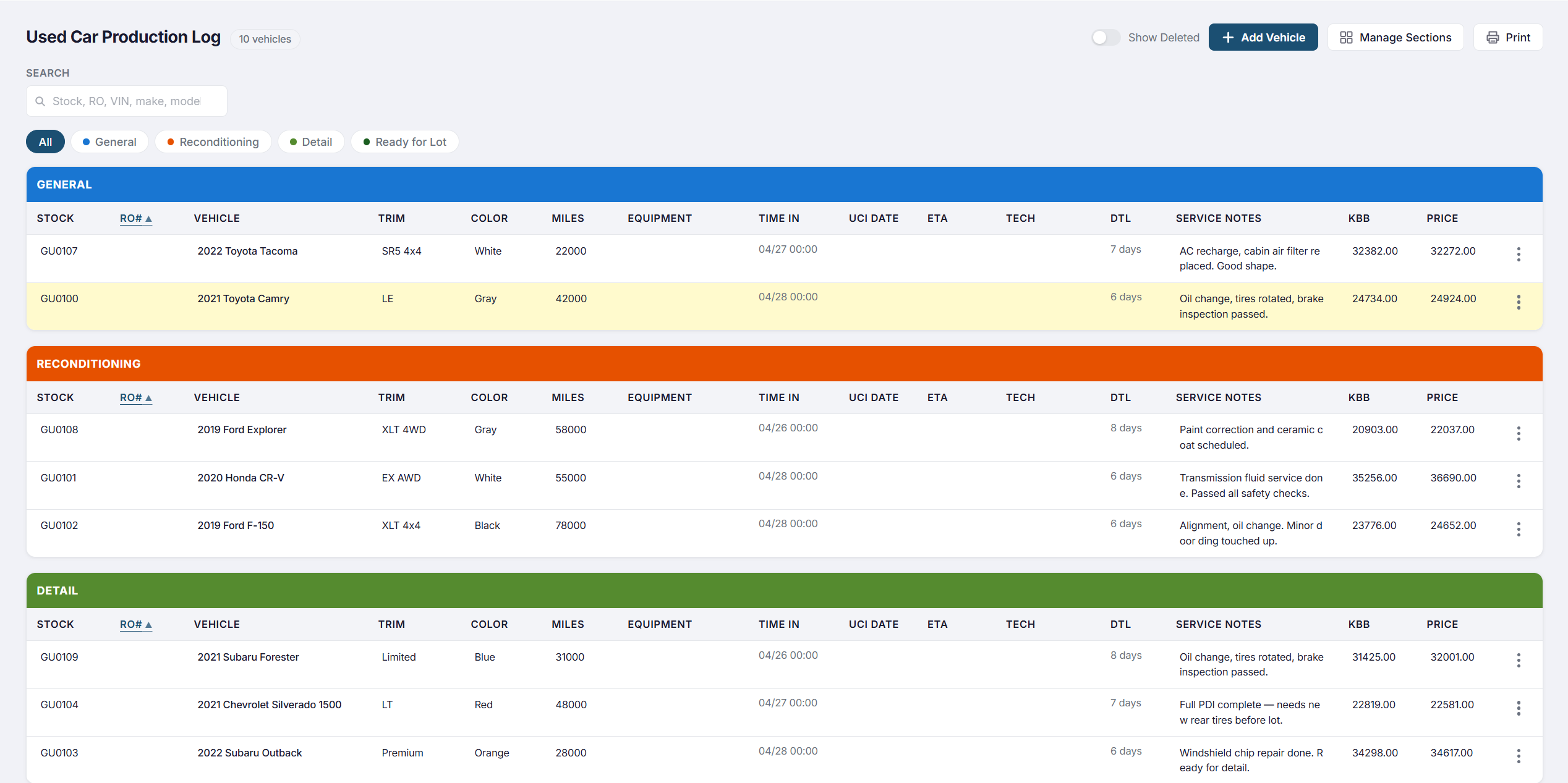
DealSync Production Log showing vehicles auto-created from deal VIN entries with recon status

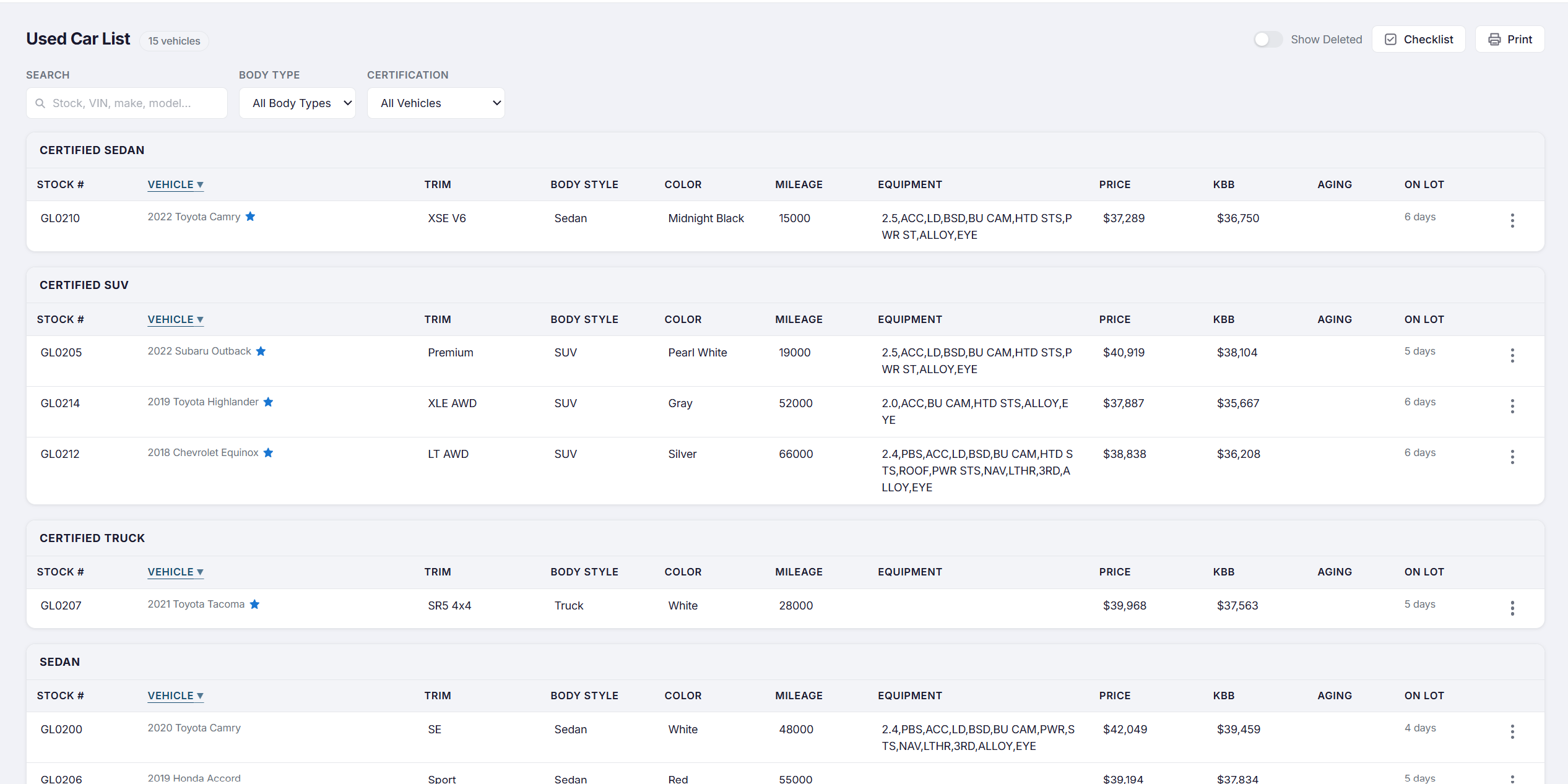
See your entire lot at a glance

The used car list shows every active vehicle with stock number, year/make/model, days on lot, current status, and reconditioning progress — all on one screen.

  • Filter by status, salesperson, or days on lot
  • Age indicators flag vehicles approaching pricing review thresholds
  • Click any row to expand vehicle detail and checklist
  • VIN, stock number, cost, and retail price tracked per vehicle
DealSync used car list showing vehicles with stock numbers, days on lot, and status badges from recon to available

Every vehicle's full history.
Across every rooftop.

Open any vehicle and see everything: VIN, stock number, cost, book value, retail price, timestamped notes, and an uneditable audit log.

Partner Store Transfers
Transfer to a partner store with full history intact — no re-entry, no lost records. The receiving store sees all notes, recon records, and the deal link from day one.
Automatic Transfer Logs
Every transfer is logged at both stores automatically with user attribution and timestamp — so there's never a question of who moved what, or when.
Full Financial Detail
VIN, stock number, cost, book value, and retail price tracked per vehicle — with a permanent, uneditable audit trail for every field change.
Permanent Archive
Sold vehicles are archived with full history intact. Pull up any car from any month — years after the sale — and see exactly what happened, who was involved, and when.

See the Used Car Pipeline live

Book a 30-minute demo and we'll show you how DealSync gives your used car operation the structure and visibility it's been missing.